Wednesday, June 17, 2015

Magento Debugging Techniques

The tips I am mentioning for Magento debugging can be applied on any LAMP application.

Clear the Magento Cache
If you are using caching at all within Magento, one of the first steps to answering the question - "Why is this not working?" - is to clear the Magento cache. There are two ways to clear the cache:
  • System > Cache Management > Select All > "Refresh" Massaction > Submit
  • Delete the "cache" directory under BASE_MAGENTO_DIR/var

Clear the Browser Cache
More than once, I have wasted 10 minutes trying to figure out why something wasn't rendering to the browser correctly, only to find that my browser was caching old responses. If you don't know how to clear your browser cache, see the following links:
  • Firefox
  • Internet Explorer
  • Safari
  • Google Chrome

Make Sure Your Configurations Are Set For the Proper Scope
Because the System > Configurations can be set for specific scopes (Default / Website / Store View), we have to make sure that we have set the configurations for the proper scope. To check this, use the Magento Admin Panel -
  • System > Configuration > Upper Left Corner (Change to the scope/store view you are working with)

Turn On Magento Logging
This one is a big one. Almost EVERY time, if there is a problem in Magento, something will appear in either the system.log or the exception.log. Checking these logs should become second nature to you. To turn on logging, use the Magento Admin Panel -
  • System > Configuration > Advanced > Developer > Log Settings > Enable
  • Check the magento exception.log under BASE_MAGENTO_DIR/var
  • Check the magento system.log under BASE_MAGENTO_DIR/var

Use Template Path Hints
Template Hints are pretty amazing. When you want to figure out which Block or phtml file a problem is occurring in, you can turn on template hints and see the information right on the browser. It's awesome, so if you haven't tried it, try it right now.
To turn on template path hints, use the Magento Admin Panel -
First, you NEED to select the store view you want to show the hints on. If you don't, the configuration option won't appear.
  • System > Configuration > Advanced > Developer > Debug > Template Path Hints and/or Add Block Names to Hints
  • By default, there is no way to turn on hints for the Admin Panel, so take a look at Easy_Template_Path_Hints extension. It will help you to enable path hints with a easier step. [SOURCE]

Tracing
If you have implemented a home-grown tracing mechanism, turn it on and look at the log. A common tracing mechanism consists of coding tracing statements within the code that log ENTRY into a function, important information within the function, and EXIT from the function. This information can be crucial in debugging problems in a production environment.

XDebug Tracing
XDebug provides some pretty kick-butt tracing ability. If you turn it on, get ready for a lot of data, but it can be very helpful when trying to pinpoint a problem. In the article "Tracing PHP Applications with xdebug" it gives some really good information about xdebug tracing.

Check the Apache error_log

When all else fails, take a look at the apache error_log. It could be a problem with the setup of your webserver.

Google It
It may come as a surprise, but there are still people that don't turn to Google as a "troubleshooting option". They should. When you want to ask a developer something, first ask it to Google. For instance, if you want to know how to do a rewrite of a model, just Google: How do I rewrite a model in Magento. If you want to know why you are getting an error like "HEADERS ALREADY SENT", Google: headers already sent magento. Chances are, another developer will give you a response like THIS if you ask them the question anyway.

Search Or Ask The Magento Forums
One of the big pros to Magento is the active community members. Many are willing to help answer your questions for free, and quickly. Before you ask your question, search the forums. If you don't find your answer, ask your question.

Use the Varien_Profiler
If you are having performance issues, turn on and use the Varien_Profiler. Do this in the Admin Panel -
  • System > Configuration > Advanced > Developer > Debug > Profiler
http://inchoo.net/ecommerce/magento/keeping-your-magento-fit-with-built-in-profiler/
http://www.neptuneweb.com/blog/?id=24

Hope it might help.

Wednesday, March 18, 2015

Magento 2 installation

How to install Magento 2 ?

Here is the following step need to be followed -


Step 1: Check system Configuration

  • Apache Version: 2.2 or 2.4 and Enable: mod_rewrite.mod_rewrite enables the server to perform URL rewriting.
  • PHP: 5.4.x where x = 11 or later  5.5.x and
  • Enable PHP Extension: PDO/MySQL,mbstring, mcrypt, mhash, simplexml, curl, gd2, ImageMagick 6.3.7 (or later) or both soap and
  • add xdebug.max_nesting_level=50000; at php.ini
  • MySQL Version : 5.6.x and upper
For installing magento 2 at wamp you need check above php setting then follow the below process:


Step 2: Download Magento2

Download Magento 2 from Github https://github.com/magento/magento2


Step 3: Download Composer.exe

Magento now using Composer to install the software. Composer enables us to manage the Magento system, extensions, and their dependencies. Composer provides you with the following advantages:
  • Enables you to reuse third-party libraries without bundling them with source code
  • Component-based architecture with robust dependency management
  • Magento dependencies to reduce extension conflicts and compatibility issues
  • Versioned dependencies
  • Semantic versioning
  • Supports PHP Framework Interoperability standard
  • We’ll have more information soon on how developers can use Composer to package extensions to distribute to Magento merchants and to other developers.
 From here you can download Composer.exe.

During installation process the installer request to you ,to select your php.exe which is located at
  • wamp - \wamp\bin\php\php5.5.12(Php version)\php.exe
  • xampp - \xampp\php\php.exe
After installing the composer.exe, you need to run the Command Prompt and reach to your Magento2 directory.

Now run the command - composer install

Above command will initialize the composer. And its time to restart your Apache Server.

Step 4: Now Install Magento 2

Now you are able to run the Magento 2 setup using browser. Following window will open during the installation process of Magento -

1) Agreement Window

2)Setup Description -


3) Setup Database -


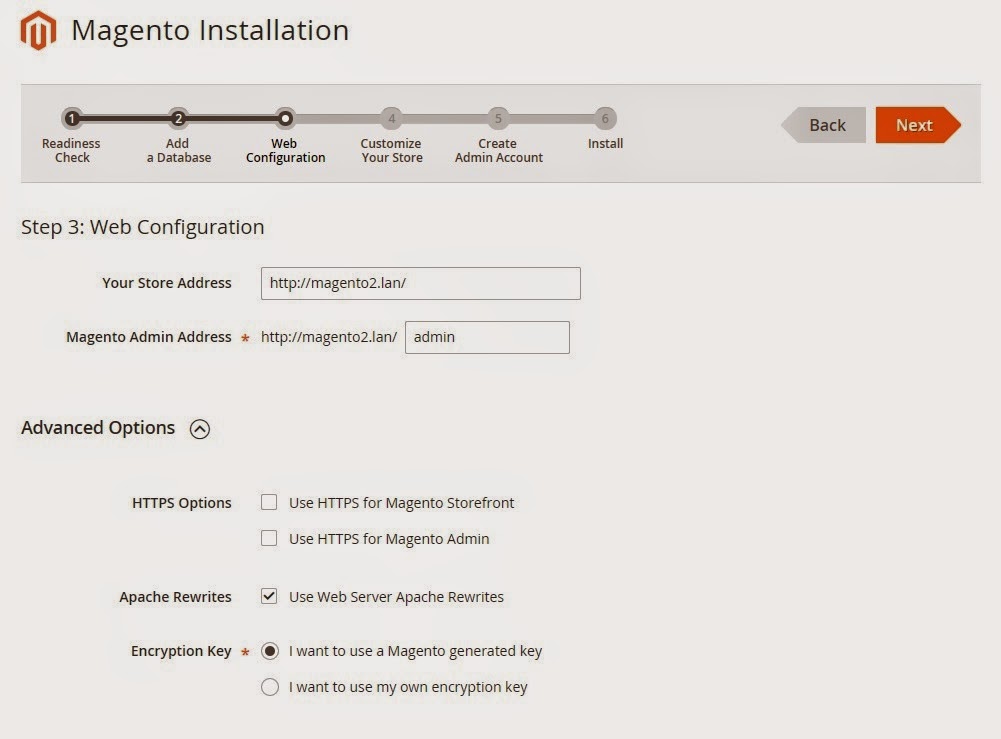
4)Web Configuration -


5) Customize Store Setting -


6) Setup Administration Details -


7) Installation Started -


7) Congratulations!

Still facing problem ? Contact Us - aforankur@hotmail.com

Note : This post written by Magento Certified Developer. For any help or assistance email at given address.


Sunday, March 15, 2015

Magento 2 | 10 most important features

Magento is a leading e-commerce solution and a huge platform for Merchants that enables them to sell their products online. This platform has more than 4 million downloads worldwide. And now we can witness the dawn of Magento 2. The new version of this platform brings lots of new features that have all the chances to play a key role in the growth of e-commerce market. In this post you can find 10 most important features of Magento 2.


Magento 2 - Better compatibility with other platforms

Magento 2 is based on Zend Framework and PHP 5.4, it also extends support for MSSQL, Oracle,  and other databases.

Magento 2 - The new level of flexibility

With a new structure of modules (component-based), the new Magento has a much better flexibility in terms of development. The high code coupling in combination with a component oriented structure allows developers to different components including CMS, customer, checkout, sales, catalog, and a lot more. In Magento 2, it is possible to disable or enable every component and at the same time to keep the code base clean.

Magento 2 - Testing-friendly environment

Magento 2 is 100% testing-friendly. It includes a flawless testing framework designed to perform: Static Tests, Performance Tests, Unit Tests, Legacy and Migration Tests, Integration Tests and JavaScript Unit Tests.

Magento 2 - Service Contracts

Service Contracts is another important feature of Magento 2, which is based on a set of different PHP Interfaces. The feature improves and simplifies the use of APIs for various modules. With Service Contracts, developers will get a new way of working with public API endpoints.

Magento 2 - The new file structure

Magento 2 comes with a completely new file structure. There is no base theme anymore and all the base views are in the module structure. Developers now face much less issues while developing custom Magento themes.

Magento 2 - Hassle-free upgrades and installation

Composer makes Magento 2 more friendly for an installation and updates. It is also possible to use a convenient format to upgrade to the latest Magento 2 version.

Magento 2 - Elimination of components and modules

Magento 2.0 provides advanced payment options. The new version of config.xml file is reduced by over 20%, as a result developers are able to offer customizable solutions within less amount of time.

Magento 2 - The concept of view

The complexity and overall development time in Magento 2 has been considerably reduced thanks to ‘the concept of view in the module’. The feature also enables developers to create the working view within no time.

Magento 2 - Better Security

Thanks to the changed directory structure, Magento 2 is more secure. There is a new directory – ‘pub’, which enables developers to protect the code from different security breaches.

Magento 2 - The Magento Community

The Magento development team is opened to the community of Magento coders, we can receive a seamless support for any issues related with Magento 2.


Thursday, March 6, 2014

Magento | Chrome Login Problem

Magento facing this issue due to Cookie's life time and some setting restrictions.

Here is two solutions you may try in order to solve such issue.
  • Change the cookie lifetime configuration.Go to backend -> Sytem -> Configuration -> Web -> Session and Cookie Management Set cookie lifetime to 86400 and save it .

Another way to solve it is -
Go to the following directory - app/code/core/Mage/Core/Model/Session/Abstract/ within your magento and open Varien.php file.

Find the following code -
$cookieParams = array(
    'lifetime' => $cookie->getLifetime(),
    'path'     => $cookie->getPath(),
    'domain'   => $cookie->getConfigDomain(),
    'secure'   => $cookie->isSecure(),
    'httponly' => $cookie->getHttponly()
);
and replace it with the following code -
$cookieParams = array(
    'lifetime' => $cookie->getLifetime(),
    'path'     => $cookie->getPath()
//  'domain'   => $cookie->getConfigDomain(),
//  'secure'   => $cookie->isSecure(),
//  'httponly' => $cookie->getHttponly()
); 
Hope it will work. Thanks. 

Tuesday, January 28, 2014

Optimizing Magento Performance

Enable Output Compression

This section will turn on the apache mod_deflate module, which compresses text, css, and javascript before it is sent to the browser. This results in a smaller download size. To enable, simply uncomment the appropriate lines so that it looks like the following:
<IfModule mod_deflate.c>

############################################
## enable apache served files compression
## http://developer.yahoo.com/performance/rules.html#gzip

    # Insert filter on all content
    SetOutputFilter DEFLATE
    # Insert filter on selected content types only
    AddOutputFilterByType DEFLATE text/html text/plain text/xml text/css text/javascript application/javascript

    # Netscape 4.x has some problems...
    BrowserMatch ^Mozilla/4 gzip-only-text/html

    # Netscape 4.06-4.08 have some more problems
    BrowserMatch ^Mozilla/4\.0[678] no-gzip

    # MSIE masquerades as Netscape, but it is fine
    BrowserMatch \bMSIE !no-gzip !gzip-only-text/html

    # Don't compress images
    SetEnvIfNoCase Request_URI \.(?:gif|jpe?g|png)$ no-gzip dont-vary

    # Make sure proxies don't deliver the wrong content
    Header append Vary User-Agent env=!dont-vary

</IfModule>

Enable Expire Headers

NOTE: This does not work on Litespeed servers.
Browsers use Expires headers to determine how long a page component can be cached. Static components, like images, should have far-future expires headers, but truthfully, all page components should have expires headers. To turn this feature on, just uncomment the appropriate line and add "ExpiresActive On" right above it. See below:
<IfModule mod_expires.c>

############################################
## Add default Expires header
## http://developer.yahoo.com/performance/rules.html#expires

    ExpiresActive On
    ExpiresDefault "access plus 1 year"

</IfModule>

Disable ETags

ETags are a way for browsers to validate cached components across subsequent visits. They can slow down a site served from a cluster if the cluster hasn't implemented them properly. It is best to just turn them off as follows:

############################################
## If running in cluster environment, uncomment this
## http://developer.yahoo.com/performance/rules.html#etags

    FileETag none

Combine CSS and JS Files

This feature reduces the number of HTTP requests. For versions earlier than 1.4.x, the Fooman_Speedster extension can be used instead.

WARNING WARNING: Combining CSS/JS when using CDN will cause CSS/JS to "break" until the CDN updates completely. It is recommended to perform this process at the beginning off-peak hours, to allow enough time for the "new" CSS/JS to reach the CDN.
  • In the Magento Admin, go to System > Configuration > Developer.
  • Under "Javascript Settings", change "Merge Javascript Files" to YES.
  • Under "CSS Settings", change "Merge CSS Files" to YES.
  • Clear the cache.

Enable Flat Catalog

Magento uses the EAV model to store customer and product data. This enables these objects to be incredibly extensible, but results in longer SQL queries and more reads. Enabling the Flat Catalog for Categories and Products merges product data into one table, thereby improving performance. Generally, all stores should enable Flat Catalog for Categories. Stores with over 1000 products should enable Flat Catalog for Products.
  • In the Magento Admin, go to System > Configuration > Catalog.
  • Under "Frontend", change "Use Flat Catalog Category" to YES.
  • Under "Frontend", change "Use Flat Catalog Product" to YES. (optional)
  • Clear the cache.

Enable the Magento Compiler

WARNING WARNING: Exercise caution when using extensions with the compiler, as some extensions may cause major issues for your site. It is recommended that you use as few extensions as possible to decrease the risk of compromising your site's stability.

Magento's application files are searched for in the following order:

  • app/code/local
  • app/code/community
  • app/code/core
  • lib
This search is performed for every page load, every time, resulting in a lot of filesystem reads. The Mage_Compiler reduces the number of reads by copying all of the application files to a single include directory. It also caches the most frequently used pages.
  • In the Magento Admin, go to System > Tools > Compilation.
  • Click "Run Compilation Process"

Magento Database Maintenance

Magento does many things well, but maintaining an efficient database is not one of them. Having a lot of products is a good reason to have a large database. Sadly, this isn't the only way your database can become big and sluggish. Maintaining the database through log cleaning can result in a dramatic improvement in site performance and latency. This guide explains how to clean up a Magento database that has grown too large for its own good.

NOTE: Before performing any operations on the database, please make a backup.

Log Cleaning

Magento maintains several tables for logging. These tables log things such as customer accesses and which products have been compared. Magento has a mechanism for cleaning these logs regularly, but unfortunately this feature is disabled by default and most customers do not turn it on. There are three ways to clean out these tables: via Log Cleaning in the Magento Admin, via log.php in the ../shell directory, and manually via phpMyAdmin or mysql client.

The following tables are managed by Magento's Log Cleaning function:

log_customer
log_visitor
log_visitor_info
log_url
log_url_info
log_quote
report_viewed_product_index
report_compared_product_index
report_event
catalog_compare_item

Log Cleaning via Admin
  • In the Magento Admin, go to System > Configuration.
  • In the left menu under Advanced click on System.
  • Under "Log Cleaning", change "Enable Log Cleaning" to YES and configure the Save Log for 15 days.

Code Level - Magento Optimization -

  • Calculating the size of an array on each iteration of a loop
  • SQL queries inside a loop
  • Loading the same model multiple times
  • Redundant data set utilization
  • Inefficient memory utilization

Friday, December 6, 2013

Magento | Get Product Minimum Sale Qty on Category View / Product List Page

Here is the following code snippet required to be added into your file where you want to display the Minimum Sale Quantity of the Product -

<?php $loadProduct = Mage::getModel('catalog/product')->load( $_product->getId() ); ?>
<?php echo $this->getMinimalQty($loadProduct); ?>

Paste and Enjoy!

Tuesday, December 3, 2013

Magento | Create Custom CSV and Download

Here is the following code we can use to Create a Custom CSV using some values and Download.

Currently, I am trying to download the csv for all products of Orders. Here is the Sample Code I am using in Controller given below -

$orders = Mage::getModel("sales/order")->getCollection();
// prepare CSV header
            $csv = '';
            $_columns = array(
                "Order Id",
                "Product Name",
                "Sku",
                "Price"
            );
            $data = array();
            // prepare CSV header...
            foreach ($_columns as $column) {
                $data[] = '"'.$column.'"';
            }
            $csv .= implode(',', $data)."\n";
            foreach ($orders as $order) {
                $items = $order->getAllItems();
                // echo "Order - ".$order->getId()."<br>";
                foreach ($items as $item) {
                    $loadProduct = Mage::getModel('catalog/product')->load($item->getProductId());
                    //prepare csv contents
                    $data = array();
                    $data[] = $loadProduct['id'];
                    $data[] = $loadProduct['name'];
                    $data[] = $loadProduct['sku'];
                    $data[] = $loadProduct['price'];
                    //...
                    $csv .= implode(',', $data)."\n";
                    //now $csv varaible has csv data as string
                }
            }
        }
        $this->_redirect('*/*/');
        $this->_prepareDownloadResponse('file.csv', $csv, 'text/csv'); 

Saturday, December 1, 2012

Magento - Get all Categories and Subcategories

It is not such a typical task. Here is the code to get all Categories and Subcategories in Magento -


<?php $_helper = Mage::helper('catalog/category') ?>
<?php $_categories = $_helper->getStoreCategories() ?>
<?php $currentCategory = Mage::registry('current_category') ?>
<?php if (count($_categories) > 0): ?>
<div id="tabs-1">
    <ul id="tree1">
        <?php foreach($_categories as $_category): ?>
            <li>
                    <input type="checkbox" value="<?php echo $_category->getId() ?>"><label><?php echo $_category->getName() ?></label>
                <?php $_category = Mage::getModel('catalog/category')->load($_category->getId()) ?>
                <?php $_subcategories = $_category->getChildrenCategories() ?>
                <?php if (count($_subcategories) > 0): ?>
                    <ul>
                        <?php foreach($_subcategories as $_subcategory): ?>
                            <li>
                                <input type="checkbox" value="<?php echo $_subcategory->getId() ?>"><label><?php echo $_subcategory->getName() ?></label>
<?php $_category = Mage::getModel('catalog/category')->load($_subcategory->getId()) ?>
               <?php $_subsubcategories = $_subcategory->getChildrenCategories() ?>
               <?php if (count($_subsubcategories) > 0): ?>
                   <ul>
                       <?php foreach($_subsubcategories as $_subsubcategory): ?>
                           <li>
                               <input type="checkbox" value="<?php echo $_subsubcategory->getId() ?>"><label><?php echo $_subsubcategory->getName() ?></label>
                           </li>
                       <?php endforeach; ?>
                   </ul>
               <?php endif; ?>

                            </li>
                        <?php endforeach; ?>
                    </ul>
                <?php endif; ?>
            </li>
        <?php endforeach; ?>
    </ul>
</div>
<?php endif; ?>

Enjoy!! :-)

Friday, November 30, 2012

Get Latitude and Longitude using Address in php

Here is the code snippet by which you can find the Latitude and Longitude using the Customer Address -


public function getLatLongArray($_Country, $_State)
{
$address = $_Country."+".$_State;

$_CountryName = Mage::app()->getLocale()->getCountryTranslation($_Country);

$url = "http://maps.google.com/maps/api/geocode/json?address=$address&sensor=false&region=$_CountryName";
$ch = curl_init();
curl_setopt($ch, CURLOPT_URL, $url);
curl_setopt($ch, CURLOPT_RETURNTRANSFER, 1);
curl_setopt($ch, CURLOPT_PROXYPORT, 3128);
curl_setopt($ch, CURLOPT_SSL_VERIFYHOST, 0);
curl_setopt($ch, CURLOPT_SSL_VERIFYPEER, 0);
$response = curl_exec($ch);
curl_close($ch);
$response_a = json_decode($response);
echo $lat = $response_a->results[0]->geometry->location->lat;
echo "<br />";
echo $long = $response_a->results[0]->geometry->location->lng;

return array(
'latitude' => $lat,
'longitude' => $long,
);
}

Enjoy!! :-)

Saturday, October 20, 2012

Magento : Get URLs

Here is the code to get base url, media url, store url, javascript url, images path etc in Magento.

To retrieve URL path in Static Block -

To get Skin URL
{{skin url='images/anx.jpg '}}
To get Media URL
{{media url='/anx.jpg'}}
To get Store URL
{{store url='anx.html'}}
To get Base URL
{{base url='storename/anx.html'}}

To Retrieve URL path in PHTML -
Note: In editing PHTML don't forget to enclode the following code with PHP tag

Not secure Skin URL:
<?php echo getSkinUrl('images/anx.jpg') ?> 
Secure Skin URL
<?php echo getSkinUrl('images/ anx.gif', array('_secure'=>true)) ?>
Get Current URL
$current_url = Mage::helper('core/url')->getCurrentUrl();
Get Home URL
$home_url = Mage::helper('core/url')->getHomeUrl();
Get Magento Media Url
 Mage::getBaseUrl(Mage_Core_Model_Store::URL_TYPE_LINK);
Get Magento Media Url
 Mage::getBaseUrl(Mage_Core_Model_Store::URL_TYPE_MEDIA);
Get Magento Skin Url
 Mage::getBaseUrl(Mage_Core_Model_Store::URL_TYPE_SKIN);
Get Magento Store Url
 Mage::getBaseUrl(Mage_Core_Model_Store::URL_TYPE_WEB);
Get Magento Js Url
Mage::getBaseUrl(Mage_Core_Model_Store::URL_TYPE_JS);

Thursday, September 27, 2012

Bestselling Products in Magento

To add a block into Home Page you need to  login into the Magento : CMS > Manage Pages > Home. Then add the following to the Content area:

{{block type=”catalog/product” show_total=”12″ template=”catalog/product/bestseller.phtml”}}

Now put the following code into catalog/product/bestseller.phtml -

   $visibility = array(
        Mage_Catalog_Model_Product_Visibility::VISIBILITY_BOTH,
        Mage_Catalog_Model_Product_Visibility::VISIBILITY_IN_CATALOG
  );

  $_productCollection = Mage::getResourceModel('reports/product_collection')
                      ->addAttributeToSelect('*')
                      ->addOrderedQty()
                      ->addAttributeToFilter('visibility', $visibility)
                      ->setOrder('ordered_qty', 'desc');
   $totalPerPage = ($this->show_total) ? $this->show_total : 6 ;
   $counter = 1;
Here you have the Best selling Product Collection. Now feel free to manage your Bestseller page with your own Style.

Friday, August 17, 2012

Magento - Get all Cart Product's Categories

Here is the following Code to Get all Product Categories related with Cart :
Use Checkout Session :
$session = Mage::getSingleton('checkout/session');
foreach($session->getQuote()->getAllItems() as $item):
     $_product = Mage::getModel('catalog/product')->loadByAttribute('sku', $item->getSku());
     $cartProductCatId = $_product->getCategoryIds();
endforeach;

Wednesday, May 23, 2012

List of Observers in Magento

Magento Uses a fantastic Event hooking System that enables us to add additional functionality as plug-in without modifying our Code. Here is the List of Observers :


Magento
Module
Event Name
Mage
Admin
admin_session_user_login_success
Mage
Admin
admin_session_user_login_failed
Mage
Admin
admin_user_authenticate_after
Mage
Adminhtml
adminhtml_block_html_before
Mage
Adminhtml
adminhtml_catalog_category_tabs
Mage
Adminhtml
adminhtml_catalog_category_tree_is_moveable
Mage
Adminhtml
adminhtml_catalog_category_tree_can_add_root_category
Mage
Adminhtml
adminhtml_catalog_category_tree_can_add_sub_category
Mage
Adminhtml
adminhtml_product_attribute_types
Mage
Adminhtml
adminhtml_catalog_product_edit_prepare_form
Mage
Adminhtml
adminhtml_catalog_product_edit_element_types
Mage
Adminhtml
adminhtml_catalog_product_attribute_set_main_html_before
Mage
Adminhtml
adminhtml_catalog_product_attribute_set_toolbar_main_html_before
Mage
Adminhtml
adminhtml_catalog_product_form_prepare_excluded_field_list
Mage
Adminhtml
adminhtml_catalog_product_edit_prepare_form
Mage
Adminhtml
adminhtml_catalog_product_edit_element_types
Mage
Adminhtml
adminhtml_catalog_product_edit_tab_attributes_create_html_before
Mage
Adminhtml
adminhtml_cms_page_edit_tab_content_prepare_form
Mage
Adminhtml
adminhtml_cms_page_edit_tab_design_prepare_form
Mage
Adminhtml
adminhtml_cms_page_edit_tab_main_prepare_form
Mage
Adminhtml
adminhtml_cms_page_edit_tab_meta_prepare_form
Mage
Adminhtml
adminhtml_widget_grid_filter_collection
Mage
Adminhtml
adminhtml_widget_container_html_before
Mage
Adminhtml
adminhtml_controller_action_predispatch_start
Mage
Adminhtml
adminhtml_customer_prepare_save
Mage
Adminhtml
adminhtml_customer_save_after
Mage
Adminhtml
on_view_report
Mage
Adminhtml
catalog_category_prepare_save
Mage
Adminhtml
catalog_controller_category_delete
Mage
Adminhtml
catalog_product_new_action
Mage
Adminhtml
catalog_product_edit_action
Mage
Adminhtml
catalog_product_prepare_save
Mage
Adminhtml
catalog_controller_product_delete
Mage
Adminhtml
catalog_product_to_website_change
Mage
Adminhtml
cms_page_prepare_save
Mage
Adminhtml
adminhtml_cmspage_on_delete
Mage
Adminhtml
adminhtml_cmspage_on_delete
Mage
Adminhtml
admin_permissions_role_prepare_save
Mage
Adminhtml
adminhtml_controller_catalogrule_prepare_save
Mage
Adminhtml
adminhtml_controller_salesrule_prepare_save
Mage
Adminhtml
adminhtml_sales_order_create_process_data
Mage
Adminhtml
adminhtml_sales_order_creditmemo_register_before
Mage
Adminhtml
admin_system_config_changed_section_{$section}
Mage
Adminhtml
store_group_save
Mage
Adminhtml
store_edit
Mage
Adminhtml
store_add
Mage
Adminhtml
store_delete
Mage
Adminhtml
sales_convert_order_to_quote
Mage
Adminhtml
sales_convert_order_item_to_quote_item
Mage
Api
api_user_authenticated
Mage
Bundle
bundle_product_view_config
Mage
Bundle
prepare_catalog_product_index_select
Mage
Bundle
prepare_catalog_product_price_index_table
Mage
Bundle
catalog_product_prepare_index_select
Mage
Bundle
catalog_product_get_final_price
Mage
Catalog
catalog_block_product_list_collection
Mage
Catalog
catalog_product_view_config
Mage
Catalog
catalog_product_upsell
Mage
Catalog
catalog_controller_category_init_before
Mage
Catalog
catalog_controller_category_init_after
Mage
Catalog
catalog_controller_product_init_before
Mage
Catalog
catalog_controller_product_init
Mage
Catalog
catalog_controller_product_init_after
Mage
Catalog
catalog_controller_product_view
Mage
Catalog
catalog_product_compare_add_product
Mage
Catalog
catalog_product_compare_remove_product
Mage
Catalog
catalog_helper_output_construct
Mage
Catalog
catalog_category_tree_move_before
Mage
Catalog
$this→_eventPrefix.’_move_before’
Mage
Catalog
$this→_eventPrefix.’_move_after’
Mage
Catalog
catalog_category_tree_move_after
Mage
Catalog
category_move
Mage
Catalog
$this→_eventPrefix.’_validate_before’
Mage
Catalog
$this→_eventPrefix.’_validate_after’
Mage
Catalog
catalog_model_product_duplicate
Mage
Catalog
catalog_product_is_salable_before
Mage
Catalog
catalog_product_is_salable_after
Mage
Catalog
$this→_eventPrefix.’_delete_after_done’
Mage
Catalog
catalog_product_import_after
Mage
Catalog
catalog_product_website_update_before
Mage
Catalog
catalog_product_website_update
Mage
Catalog
catalog_product_status_update
Mage
Catalog
catalog_product_get_final_price
Mage
Catalog
catalog_category_change_products
Mage
Catalog
$this→_eventPrefix . ‘_load_before’
Mage
Catalog
$this→_eventPrefix . ‘_load_after’
Mage
Catalog
$this→_eventPrefix . ‘_add_is_active_filter’
Mage
Catalog
catalog_category_tree_init_inactive_category_ids
Mage
Catalog
catalog_category_tree_init_inactive_category_ids
Mage
Catalog
catalog_category_tree_move_before
Mage
Catalog
catalog_category_tree_move_after
Mage
Catalog
$this→_eventPrefix . ‘_load_before’
Mage
Catalog
$this→_eventPrefix . ‘_load_after’
Mage
Catalog
$this→_eventPrefix . ‘_add_is_active_filter’
Mage
Catalog
catalogindex_prepare_price_select
Mage
Catalog
catalog_prepare_price_select
Mage
Catalog
catalog_product_collection_load_before
Mage
Catalog
catalog_product_collection_load_after
Mage
Catalog
catalog_product_collection_before_add_count_to_categories
Mage
Catalog
catalog_product_collection_apply_limitations_after
Mage
Catalog
catalog_product_compare_item_collection_clear’
Mage
Catalog
catalog_product_flat_prepare_columns
Mage
Catalog
catalog_product_flat_prepare_indexes
Mage
Catalog
catalog_product_flat_rebuild
Mage
Catalog
catalog_product_flat_update_product
Mage
Catalog
prepare_catalog_product_index_select
Mage
Catalog
prepare_catalog_product_index_select
Mage
Catalog
prepare_catalog_product_index_select
Mage
Catalog
prepare_catalog_product_index_select
Mage
Catalog
prepare_catalog_product_price_index_table
Mage
Catalog
prepare_catalog_product_price_index_select
Mage
CatalogIndex
catalogindex_plain_reindex_after
Mage
CatalogIndex
catalogindex_prepare_price_select
Mage
CatalogIndex
catalogindex_get_minimal_price
Mage
CatalogIndex
catalogindex_prepare_price_select
Mage
CatalogIndex
catalogindex_prepare_price_select
Mage
CatalogIndex
catalogindex_prepare_price_select
Mage
CatalogIndex
catalogindex_prepare_price_select
Mage
CatalogRule
catalogrule_before_apply
Mage
CatalogRule
catalogrule_after_apply
Mage
CatalogSearch
catalogsearch_reset_search_result’
Mage
Checkout
checkout_cart_add_product_complete
Mage
Checkout
checkout_controller_multishipping_shipping_post
Mage
Checkout
checkout_multishipping_controller_success_action’
Mage
Checkout
checkout_onepage_controller_success_action’
Mage
Checkout
checkout_controller_onepage_save_shipping_method
Mage
Checkout
checkout_allow_guest
Mage
Checkout
checkout_cart_product_add_after
Mage
Checkout
checkout_cart_update_items_before
Mage
Checkout
checkout_cart_update_items_after
Mage
Checkout
checkout_cart_info_item_unset_product_before
Mage
Checkout
checkout_quote_init
Mage
Checkout
checkout_quote_destroy
Mage
Checkout
checkout_type_multishipping_set_shipping_items
Mage
Checkout
checkout_type_multishipping_create_orders_single
Mage
Checkout
checkout_type_onepage_save_order
Mage
Checkout
checkout_type_onepage_save_order_after
Mage
Cms
cms_controller_router_match_before
Mage
Cms
cms_page_get_available_statuses
Mage
Core
core_block_abstract_prepare_layout_before
Mage
Core
core_block_abstract_prepare_layout_after
Mage
Core
core_block_abstract_to_html_before
Mage
Core
core_block_abstract_to_html_after
Mage
Core
http_response_send_before
Mage
Core
controller_action_layout_load_before
Mage
Core
controller_action_layout_generate_xml_before
Mage
Core
controller_action_layout_generate_blocks_before
Mage
Core
controller_action_layout_generate_blocks_after
Mage
Core
controller_action_layout_render_before’
Mage
Core
controller_action_layout_render_before_’.$this→getFullActionName()
Mage
Core
controller_action_predispatch
Mage
Core
controller_action_predispatch_’.$this→getRequest()→getRouteName()
Mage
Core
controller_action_predispatch_’.$this→getFullActionName()
Mage
Core
controller_action_postdispatch_’.$this→getFullActionName()
Mage
Core
controller_action_postdispatch_’.$this→getRequest()→getRouteName()
Mage
Core
controller_action_postdispatch
Mage
Core
controller_action_noroute
Mage
Core
controller_action_nocookies
Mage
Core
controller_front_init_before
Mage
Core
controller_front_init_routers
Mage
Core
model_load_after
Mage
Core
$this→_eventPrefix.’_load_after’
Mage
Core
model_save_commit_after
Mage
Core
$this→_eventPrefix.’_save_commit_after’
Mage
Core
model_save_before
Mage
Core
$this→_eventPrefix.’_save_before’
Mage
Core
model_save_after
Mage
Core
$this→_eventPrefix.’_save_after’
Mage
Core
model_delete_before
Mage
Core
$this→_eventPrefix.’_delete_before’
Mage
Core
model_delete_after
Mage
Core
$this→_eventPrefix.’_delete_after’
Mage
Core
model_delete_commit_after
Mage
Core
$this→_eventPrefix.’_delete_commit_after’
Mage
Core
application_clean_cache
Mage
Core
core_locale_set_locale
Mage
Core
resource_get_tablename
Mage
Core
core_layout_update_updates_get_after
Mage
Core
core_layout_update_updates_get_after
Mage
Core
core_collection_abstract_load_before
Mage
Core
core_collection_abstract_load_after
Mage
Customer
customer_registration_is_allowed
Mage
Customer
customer_customer_authenticated
Mage
Customer
customer_session_init
Mage
Customer
customer_login
Mage
Customer
customer_login
Mage
Customer
customer_login
Mage
Customer
customer_logout
Mage
Eav
adminhtml_block_eav_attribute_edit_form_init
Mage
Eav
eav_attribute_get_backend_type_by_input
Mage
Eav
eav_attribute_get_default_value_by_input
Mage
Eav
eav_collection_abstract_load_before
Mage
GoogleCheckout
google_checkout_discount_item_price
Mage
Log
log_log_clean_before
Mage
Log
log_log_clean_after
Mage
Log
log_visitor_collection_load_before
Mage
Oscommerce
store_add
Mage
Payment
payment_method_is_active
Mage
Paypal
checkout_type_onepage_save_order
Mage
Paypal
checkout_type_onepage_save_order
Mage
PaypalUk
checkout_type_onepage_save_order
Mage
PaypalUk
checkout_type_onepage_save_order
Mage
Review
review_controller_product_init_before
Mage
Review
review_controller_product_init
Mage
Review
review_controller_product_init_after
Mage
Review
review_review_collection_load_before
Mage
Rss
rss_catalog_category_xml_callback
Mage
Rss
rss_catalog_new_xml_callback
Mage
Rss
rss_catalog_special_xml_callback
Mage
Rss
rss_catalog_tagged_item_xml_callback
Mage
Rss
rss_order_new_collection_select
Mage
Rule
rule_environment_collect
Mage
Sales
sales_order_place_before
Mage
Sales
sales_order_place_after
Mage
Sales
sales_quote_remove_item
Mage
Sales
sales_quote_add_item
Mage
Sales
$this→_eventPrefix . ‘_collect_totals_before’
Mage
Sales
$this→_eventPrefix . ‘_collect_totals_after’
Mage
Sales
$this→_eventPrefix . ‘_merge_before’
Mage
Sales
$this→_eventPrefix . ‘_merge_after’
Mage
Sales
sales_convert_order_to_quote
Mage
Sales
sales_convert_quote_to_order
Mage
Sales
sales_convert_quote_address_to_order
Mage
Sales
sales_convert_quote_address_to_order_address
Mage
Sales
sales_convert_quote_payment_to_order_payment
Mage
Sales
sales_convert_quote_item_to_order_item
Mage
Sales
sales_quote_item_collection_products_after_load
Mage
Sales
sales_sale_collection_query_before
Mage
Sales
sales_order_creditmemo_refund
Mage
Sales
sales_order_creditmemo_cancel
Mage
Sales
sales_order_invoice_pay
Mage
Sales
sales_order_invoice_cancel
Mage
Sales
sales_order_item_cancel
Mage
Sales
sales_order_payment_place_start
Mage
Sales
sales_order_payment_place_end
Mage
Sales
sales_order_payment_capture
Mage
Sales
sales_order_payment_pay
Mage
Sales
sales_order_payment_cancel_invoice
Mage
Sales
sales_order_payment_void
Mage
Sales
sales_order_payment_refund
Mage
Sales
sales_order_payment_cancel_creditmemo
Mage
Sales
sales_order_payment_cancel
Mage
Sales
sales_quote_item_qty_set_after
Mage
Sales
sales_quote_item_set_product
Mage
Sales
$this→_eventPrefix . ‘_import_data_before’
Mage
Sales
sales_quote_address_discount_item
Mage
Sales
sales_quote_address_discount_item
Mage
SalesRule
salesrule_validator_process
Mage
SalesRule
sales_quote_address_discount_item
Mage
SalesRule
sales_quote_address_discount_item
Mage
SalesRule
salesrule_rule_condition_combine
Mage
Sendfriend
sendfriend_product
Mage
Tag
tag_tag_product_collection_load_after
Mage
Tax
tax_rate_data_fetch
Mage
Tax
tax_settings_change_after’
Mage
Tax
tax_settings_change_after’
Mage
Tax
tax_settings_change_after’
Mage
Tax
tax_settings_change_after’
Mage
Tax
tax_settings_change_after’
Mage
Wishlist
wishlist_add_product
Mage
Wishlist
wishlist_share